
Optimizing a website for search engines can sometimes feel like navigating a maze—full of twists, turns, and hidden pathways. Fortunately, tools like Google Search Console for SEO serve as your guiding compass, providing invaluable insights that help you understand how your site performs in Google Search. Whether you’re a seasoned SEO expert or a beginner, leveraging this free platform can profoundly impact your website’s visibility, ranking, and overall health. In this article, we delve into the intricacies of using Google Search Console for SEO, exploring how to harness its features effectively to elevate your online presence.
Understanding how to utilize google search console for seo isn’t just about fixing errors and tracking keywords. It’s about developing a strategic vision rooted in data, allowing you to identify your strengths and weaknesses from Google’s perspective. By analyzing search performance, indexing status, and user behavior, you can make data-driven decisions that create a more user-friendly and search-engine-optimized website. The genius of Google Search Console lies in its ability to demystify Google’s algorithms and provide real-time feedback, making SEO more precise and attainable.
How to Use Google Search Console for SEO – Practical Strategies and Tips
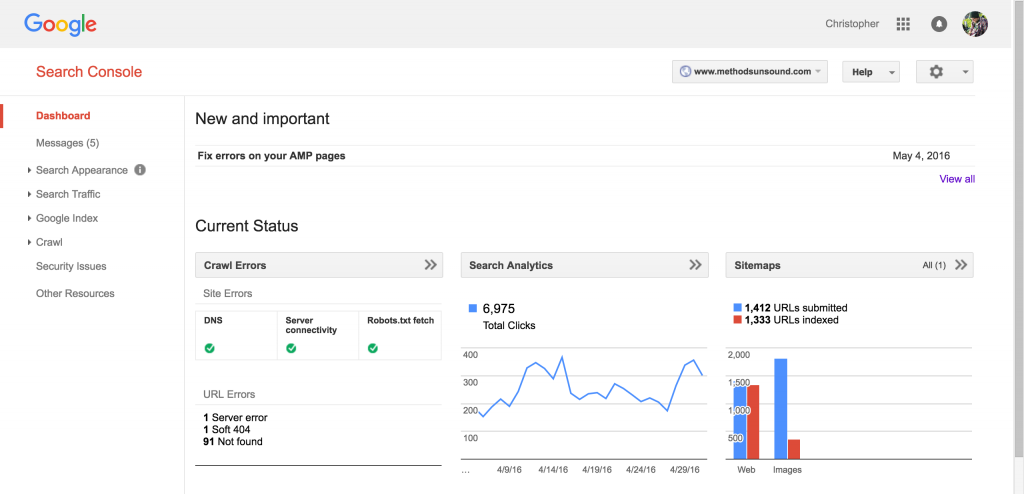
Utilizing google search console for seo begins with setup. After verifying ownership of your website—through methods like HTML tags, DNS records, or Google Analytics—you gain access to a treasure trove of insights. One of the most powerful features is the Performance report, which displays key metrics such as clicks, impressions, click-through rate (CTR), and average position for your queries and pages. Regularly monitoring this data helps you identify which keywords and content are attracting traffic, guiding future content creation and optimization efforts.
Another essential aspect is understanding and fixing site errors via the Coverage report. This feature highlights pages that Google struggles to crawl or index, such as those with 404 errors, server issues, or soft 404s. Resolving these problems ensures that your website remains accessible and indexable, directly influencing your search rankings. Furthermore, the Mobile Usability report pinpoints accessibility issues on mobile devices, aligning with Google’s mobile-first indexing priority.
To enhance SEO performance, I recommend implementing Structured Data through the Enhancements report. Structured data helps Google understand your content better, enabling features like rich snippets and knowledge panels that can boost visibility. Use the Links report to analyze your internal and external linking structure, which is vital for distributing link equity and improving crawling efficiency.
From a personal perspective, I find that regularly monitoring Search Analytics and implementing strategic adjustments based on the data—such as optimizing underperforming pages or expanding on well-ranked content—drastically improves a website’s performance. Additionally, comparing the pre- and post-implementation metrics provides concrete evidence of your SEO efforts’ efficacy, fostering a data-driven approach that takes the guesswork out of website optimization.
Comparing Google Search Console for SEO with Other SEO Tools

While Google Search Console is an invaluable free resource, many SEO practitioners complement it with paid tools like SEMrush, Ahrefs, or Moz for a more comprehensive picture. These platforms offer keyword research, backlink analysis, and competitive insights that google search console for seo alone might not fully provide. For example, GSC offers detailed data on your website’s indexing and performance on Google Search, but tools like Ahrefs excel in backlink profiles and competitor analysis.
However, the strengths of Google Search Console lie in its direct connection to Google Search data, ensuring you’re optimizing based on the most relevant and up-to-date information. It is unrivaled for technical SEO audits, troubleshooting indexing issues, and understanding user behavior on your site. My personal advice is to use GSC as your foundational tool for technical and performance insights, then supplement with other tools for strategic keyword and backlink development.
Tips and Advice for Maximizing Google Search Console for SEO

To truly unlock the potential of google search console for seo, consistency is key. Regularly check your Performance, Coverage, and Mobile Usability reports to catch issues early and capitalize on opportunities. Setting up email alerts for crawl errors or security issues ensures you’re quickly aware when something goes wrong, preventing small problems from escalating.
Another tip is to leverage the URL Inspection tool to analyze individual pages, request reindexing after updates, or troubleshoot indexing problems. This can save you time and streamline your SEO workflow. Additionally, take advantage of the Sitemaps feature—submitting your sitemap allows Google to crawl your site more efficiently, especially for larger sites with complex structures.
My personal recommendation is to develop an SEO checklist based on insights from GSC—covering technical fixes, content updates, and link building—that you review monthly. Educate yourself on Google’s evolving algorithms by reading the Search Central Blog, and stay updated on new features within GSC to continually refine your strategy. Lastly, always focus on user experience—Google’s ultimate goal is to serve relevant, high-quality content to its users, so aligning your SEO efforts accordingly will yield the best results.
FAQs About Google Search Console for SEO
What is Google Search Console, and how does it help with SEO?
Google Search Console is a free tool provided by Google that helps website owners monitor and maintain their site’s presence in Google Search results. It provides insights into how Google crawls and indexes your site, identifies issues, and offers data on search performance, enabling effective SEO strategies.
How often should I check my Google Search Console dashboard?
For optimal results, check your GSC dashboard weekly. Regular monitoring allows you to quickly identify errors, analyze performance trends, and capitalize on opportunities, keeping your SEO efforts aligned and responsive to real-time data.
Can I use Google Search Console for SEO optimization on a new website?
Absolutely. GSC is crucial for new sites, helping you submit sitemaps, identify indexing issues early, and understand how Google perceives your content. Early setup accelerates your site’s visibility and ensures technical issues don’t hinder performance.
How does Google Search Console compare to other SEO tools?
While GSC excels at providing Google-specific insights, tools like Ahrefs, SEMrush, or Moz offer broader functionalities, including competitive analysis, keyword research, and backlink tracking. Combining GSC with these tools creates a comprehensive SEO ecosystem tailored to your strategic needs.
Are there any limitations of Google Search Console for SEO?
Yes, GSC relies solely on Google data, so it doesn’t give insights into performance across other search engines like Bing or Yahoo. Additionally, some data (e.g., queries and clicks) is limited to 16 months, although this is generally sufficient for most SEO purposes.
Conclusion
Mastering google search console for seo can dramatically enhance your ability to optimize your website for better visibility and higher rankings. By understanding its features—performance analysis, technical troubleshooting, mobile usability, and structured data—you can create a healthier, more user-centric website that aligns with Google’s ranking algorithms. Combining consistent monitoring, strategic analysis, and continuous learning makes GSC an indispensable part of any effective SEO toolkit. Ultimately, leveraging this powerful platform fosters a data-driven approach that can lead to sustained search performance improvements, helping your website stand out amidst the digital competition.